

Best Tablets for Work, Study, and Entertainment in 2025 – Top Picks and Price Guide


Best tablets for work, study, and entertainment in 2025 deliver a unique blend of performance, portability, and versatility. As hardware becomes more powerful and software ecosystems more refined, tablets are evolving from “media devices” into full productivity tools capable of replacing laptops for many users. Whether you’re taking notes, editing content, running business apps, or streaming, the right tablet should balance performance, value, and everyday usability.
Samsung Galaxy Tab S10 Ultra – Work and Creativity Without a Laptop
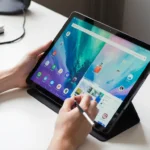
Samsung’s flagship tablet remains a top contender for productivity, entertainment, and creative workflows. With a large 120Hz AMOLED display, premium build quality, and responsive stylus support, it targets users who want a powerful device for multitasking, content creation, and note-taking.
Why it stands out

- Excellent display quality for creative work and media
- Smooth multitasking with multiple active windows
- Long battery life for full-day use
- S Pen included in the box
Limitations
Android still lacks the professional-grade ecosystem available on iPadOS, which affects high-end creative workflows.
Best for
Creative professionals, freelancers, and students who want flexibility without carrying a laptop.
Apple iPad Pro 2025 – Power, Precision, and Professional Control
The iPad Pro continues to push tablet performance into laptop territory with Apple’s M-series processor. It’s designed for advanced workflows such as 4K video editing, digital illustration, CAD modeling, and professional design.
Why it stands out
- Desktop-class performance
- Industry-leading display for color-critical work
- Best stylus experience on any tablet
- Strong ecosystem of professional apps
Limitations
- Expensive, especially with accessories
- Overkill for casual or academic use
Best for
Professionals and creative users who need uncompromising performance.
iPad Air 2025 – The Best All-Rounder for Students and Light Work
The iPad Air targets users who want reliable performance without paying Pro-level prices. It delivers excellent value for everyday productivity, schoolwork, note-taking, video calls, and casual gaming.
Why it stands out
- Lightweight and portable
- Excellent battery life
- Great app ecosystem for education and creativity
- Much cheaper than iPad Pro
Limitations
Not powerful enough for heavy video editing or professional design.
Best for
Students, teachers, and casual creators.
Microsoft Surface Go 5 – A Light Laptop Replacement for Professionals
The Surface Go is the best option for users who need Windows rather than mobile apps. With a detachable keyboard and full desktop OS, it offers a true laptop-like experience in a tablet form factor.
Why it stands out
- Full Windows for office productivity
- Comfortable keyboard options
- True multitasking with desktop apps
Limitations
- Performance is entry-level
- Not made for gaming or creative workloads
Best for
Remote workers, business users, and students who rely on Microsoft Office.
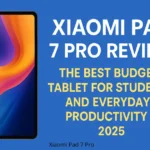
Xiaomi Pad 7 Pro – The Best Budget Tablet for Everyday Use
The Pad 7 Pro focuses on price-to-performance value, offering a premium media and browsing experience at a fraction of flagship prices. It’s a great option for students and general users.
Why it stands out
- Great screen quality
- Good performance for everyday tasks
- Competitive price
- Decent battery life
Limitations
App ecosystem and long-term software support are not as strong as Apple or Samsung.
Best for
Budget-conscious users who want reliable performance.
Gaming Tablets 2025 – Portable Power for Mobile Gamers
Mobile gaming is expanding rapidly, and high-end tablets now offer high refresh rates, powerful GPUs, and optimized cooling.
Key considerations for gamers
- 120Hz or higher refresh rate
- Low latency touch response
- Strong thermal performance
- Large battery capacity
Top picks for gaming
- iPad Pro for maximum performance
- Galaxy Tab S10 Ultra for multitasking
- Xiaomi Pad 7 Pro for budget gaming
Best for
Gamers who want console-like experience on the go.
Tablets for Kids – Safe, Durable, and Affordable
Parents now have access to a range of kid-friendly tablets featuring parental controls, educational apps, and durable construction.
What matters for kids
- Strong parental controls
- Rugged protection
- Affordable price
Best picks
- Amazon Fire HD Kids Edition
- Samsung Tab A-Series
Best for
Families seeking safe, supervised screen time.
Best Tablets for Streaming and Entertainment
For users focused on movies, series, and social media, screen quality and speakers matter more than raw performance.
Top choices
- iPad Air for balanced performance
- Galaxy Tab S10 Ultra for OLED quality
- Xiaomi Pad 7 Pro for budget streaming
How Much Should You Spend? Price Guide for 2025
- $100–$250: Kids and light basic use
- $250–$500: Students and everyday productivity
- $500–$900: Creative work and multitasking
- $1000+: Professional workflows requiring high performance
Tip: Accessories like keyboards and styluses can significantly increase the final cost.
How to Choose the Right Tablet in 2025
Ask yourself:
- Do I need a laptop replacement or a companion device?
- Will I use it for school, work, or entertainment?
- How important are screen quality and stylus support?
- Do I prefer iPadOS, Android, or Windows?
- What is my total budget including accessories?
The best tablet is the one that aligns with your lifestyle.
Conclusion
The tablet market in 2025 delivers options for every type of user—from professional creators to students and families. While the iPad Pro and Samsung Tab S10 Ultra dominate high-end performance, mid-range and budget tablets deliver excellent value and functionality.
Rather than focusing solely on specifications, users should prioritize usability, app ecosystems, and long-term support.
FAQ
Is a tablet a good laptop replacement?
For most users, yes—especially with a keyboard and productivity apps.
Which tablet is best for students?
The iPad Air delivers the best balance of price, performance, and usability.
Do tablets work well for gaming?
High-end tablets provide great gaming performance with fast displays and strong GPUs.
Discover more from Feenanoor
Subscribe to get the latest posts sent to your email.

